




Many families assume a home alarm system is enough to keep an aging parent safe. The reality is that most falls and emergencies happen when seniors are out walking, gardening, or simply moving around away from their base station. A mobile alarm travels with the person, not just the house. This guide covers what mobile alarms are, which features matter most, how accurate fall detection really is in the real world, and how to choose the right device for your loved one’s specific needs and lifestyle.
Table of Contents
- Understanding mobile alarms for elderly: What they are and how they work
- Essential features of mobile alarms: GPS, fall detection, and more
- How accurate are fall detection and emergency response?
- Choosing the right mobile alarm: Practical tips for families and caregivers
- Why peace of mind matters more than technical perfection
- Explore reliable mobile alarms and watch solutions for seniors
- Frequently asked questions
Key Takeaways
| Point | Details |
|---|---|
| Mobile alarms enable independence | Mobile alarms let seniors safely move beyond the home with quick access to help. |
| GPS and fall detection are vital | Features like GPS tracking and automatic fall detection offer critical safety for those at risk. |
| Accuracy is not perfect | False positives and missed events are common, so manual SOS buttons and caregiver alerts matter. |
| Response is fast but not always emergent | Most alarms connect to a monitoring center quickly, but many calls are non-emergencies. |
| Peace of mind outweighs technical flaws | The emotional comfort of knowing help is nearby is often more valuable than perfect detection. |
Understanding mobile alarms for elderly: What they are and how they work
Home-based alarm systems have one critical weakness: they stop working the moment a senior steps outside. Mobile alarms solve this directly. A mobile alarm for the elderly is a portable Personal Emergency Response System (PERS), designed for use outside the home without a base station. It connects through cellular networks, meaning the person carries their safety net with them wherever they go.
These devices come in several form factors, each suited to different users:
- Pendant alarms: Worn around the neck, discreet and lightweight
- Wristband alarms: Worn like a bracelet, easy to put on daily
- Alarm watches: Look like a regular watch, often include GPS and two-way calling
- Clip-on devices: Attach to clothing or a belt, good for users who resist wearables
The key difference from traditional home systems is independence from a fixed base station. A home system requires the user to be within range, typically 100 to 300 feet. A mobile alarm works anywhere with a cellular signal, which covers most parks, grocery stores, and neighborhoods where seniors spend time.
| Feature | Home alarm | Mobile alarm |
|---|---|---|
| Works outside the home | No | Yes |
| GPS location sharing | No | Yes |
| Fall detection | Some | Yes |
| Two-way calling | Via base | Via device |
| Requires base station | Yes | No |
Who benefits most? Seniors who live alone and are at risk of falls gain the most immediate value. People with early-stage dementia or wandering behavior also benefit significantly, since caregivers can track their location in real time. Even active seniors who walk or travel regularly can use fall detection alarms to stay protected beyond the front door.
“The shift from home-based to mobile alarms is not just a technology upgrade. It is a shift in philosophy: safety should follow the person, not the property.”
Essential features of mobile alarms: GPS, fall detection, and more
Not all mobile alarms are built the same. The features that matter most depend on the user’s specific risks and daily habits. Here is a breakdown of what to look for.
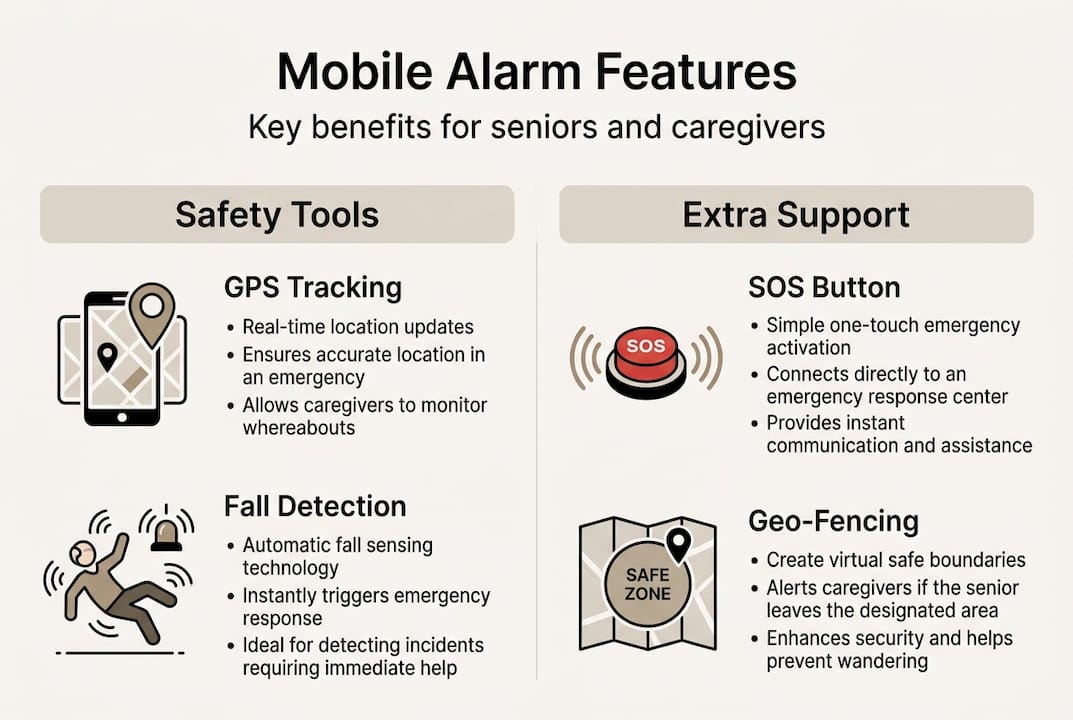
GPS tracking is the foundation of any mobile alarm for seniors with dementia or wandering behavior. Real-time location sharing lets family members check where their loved one is at any moment through a smartphone app. This removes the anxiety of not knowing.
Geo-fencing takes GPS a step further. You define a safe zone, such as the neighborhood or a specific park. If the senior leaves that zone, caregivers receive an automatic alert. This is particularly valuable for alarm watch interfaces that display simple, large icons for easy use.
Automatic fall detection uses built-in accelerometers and gyroscopes to recognize the motion pattern of a fall. If a fall is detected and the user does not respond within a set time, the device automatically calls for help. This matters most when a senior is unconscious or disoriented after a fall.
Manual SOS button remains the most reliable backup. A single press connects the user to a monitoring center or directly to a family member. For tips on getting the most from this feature, see emergency button tips.
| Feature | Primary benefit | Best for |
|---|---|---|
| GPS tracking | Real-time location | Dementia, wandering |
| Geo-fencing | Zone exit alerts | Memory care |
| Fall detection | Auto-call if unresponsive | High fall risk |
| SOS button | Manual emergency call | All users |
| Two-way calling | Voice communication | Isolated seniors |
| Mobile app alerts | Caregiver notifications | Family monitoring |
Pro Tip: Always pair automatic fall detection with a manual SOS button. Detection algorithms can miss certain types of falls, so having both options gives your loved one two layers of protection.
How accurate are fall detection and emergency response?
Fall detection sounds reassuring, but the real-world numbers tell a more nuanced story. Understanding the gap between lab performance and everyday use helps caregivers set realistic expectations.
Lab studies report impressive results. However, real-world sensitivity drops to 55%, with specificity at 89%. That means roughly half of real falls may go undetected, while false alarms from normal activities like bending, sitting down quickly, or reaching overhead are common. Slow falls, where a person slides gradually to the floor, are especially hard for sensors to catch.
Here is a breakdown of real-world performance factors:
- Sensor placement: Wrist-worn devices detect falls differently than pendant or hip-worn devices
- Movement type: Fast, hard falls trigger detection more reliably than slow slides
- Daily activities: Bending, jumping, or vigorous exercise can trigger false alarms
- User body size and gait: Algorithms trained on average populations may perform differently for individual users
| Performance metric | Lab result | Real-world result |
|---|---|---|
| Sensitivity (fall caught) | 85-98% | ~55% |
| Specificity (no false alarm) | High | ~89% |
| False positive rate | Low | Up to 86% in some sensors |
Response speed is equally important. Average response time to a monitoring center runs 20 to 40 seconds, with some systems connecting in as little as 10 seconds. That speed can be critical when someone is injured and alone.
It is also worth knowing that a large share of alarm activations are not life-threatening emergencies. Many calls are accidental or low-acuity situations. This is normal and expected. The alarm button benefits still outweigh the inconvenience of occasional false alerts, especially when the alternative is no help at all. For a side-by-side look at different devices, an alarm device comparison can help narrow down the best fit.
For caregivers who want to read the underlying emergency response research, the data reinforces one clear message: speed of response matters more than perfect detection.
Choosing the right mobile alarm: Practical tips for families and caregivers
With the facts on the table, the next step is making a smart, practical choice. Here is what to evaluate before buying.
Will the senior actually wear it? This is the single most important question. A device left on the nightstand offers zero protection. False alarms and poor compliance are especially common in dementia patients who forget to wear the device or remove it. Choose a form factor the person finds comfortable and unobtrusive.
Check cellular coverage in their area. Mobile alarms depend on signal strength. Rural properties, basements, and some indoor spaces may have dead zones. Test the device in the locations your loved one spends the most time.
Set up geo-fencing right away. If wandering is a concern, configure the safe zone during setup. Do not wait for an incident to activate this feature.
Pair auto-detection with a manual button. Since studies show no reduction in hospitalizations from alarms alone, the real value is in fast response and peace of mind. A manual SOS button ensures the user can always call for help even when the sensor misses a fall.
Key checklist for families:
- Confirm the device works on the local cellular network
- Test fall detection with a simulated movement before relying on it
- Set up caregiver app notifications for GPS and geo-fence alerts
- Establish a daily routine that includes putting the device on
- Review the elderly protection options available for different risk levels
“The goal is not a perfect device. The goal is a reliable safety net that gives your loved one the confidence to keep living independently.”
For a broader look at top-rated options, the best elderly alarms guide covers the leading choices across different budgets and needs.
Pro Tip: Involve the senior in the selection process. When they choose the device themselves, they are far more likely to wear it consistently every day.
Why peace of mind matters more than technical perfection
After reviewing the data, it is tempting to focus on what mobile alarms cannot do. The sensitivity gap, the false alarms, the coverage limits. These are real limitations. But they miss the bigger picture.
Research confirms that mobile alarms do not significantly reduce hospitalizations. That finding surprises many families. But what the same research also shows is that the value lies in speed of response and the reassurance it provides to both seniors and their caregivers.
When a senior knows help is one button press away, they move more freely. They go for that walk. They stay in their own home longer. That independence has real quality-of-life value that no hospital statistic can fully capture.
For families, the benefit is equally concrete. Knowing that a parent wearing a GPS smartwatch can be located and helped within minutes changes the emotional weight of caregiving. It does not eliminate worry, but it makes worry manageable.
The honest truth is this: no device is perfect. The right question is not “will this catch every fall?” but “will this get help there faster than without it?” The answer, consistently, is yes.
Explore reliable mobile alarms and watch solutions for seniors
Finding the right mobile alarm takes more than a quick search. It means matching features to your loved one’s specific risks, habits, and comfort level.
For a detailed breakdown of top-rated devices, the best alarm watch for seniors guide compares SOS watches side by side so you can make a confident choice. If GPS tracking is a priority, explore the GPS watch benefits for seniors to understand exactly what location features offer in daily use. For a broader overview of wearable options, the smartwatch options page covers simple, senior-friendly designs built for safety and ease of use. Our team is available to help you find the right fit.
Frequently asked questions
Can mobile alarms be used anywhere, or do they have coverage limits?
Mobile alarms rely on cellular networks, so coverage depends on signal strength in the area. Signal dead zones in rural areas or basements can limit effectiveness, so testing the device in your loved one’s most-used locations is always a good idea.
How reliable is fall detection in mobile alarms for elderly?
Lab studies report up to 98% accuracy, but real-world sensitivity is 55%, meaning slow falls and normal daily movements can both trigger false alarms or go undetected. A manual SOS button provides an important backup.
Do mobile alarms really reduce hospitalizations among seniors?
Studies show no significant reduction in hospitalizations, but the real value is in faster emergency response and the peace of mind it provides to both seniors and their families.
What happens if the senior forgets to wear their mobile alarm?
If the device is not worn, none of its safety features can activate. Poor compliance is especially common in users with dementia, so building a daily wearing routine and choosing a comfortable form factor are both critical steps.
How fast is emergency response when an alarm is triggered?
Most mobile alarms connect to a monitoring center within 20 to 40 seconds, enabling quick assessment and dispatch of help to the user’s GPS location.