




Not all alarm watches work the same way, and that difference can matter enormously when a senior falls alone at home. Many families assume any wearable alarm will do the job, but alarm watch interfaces for seniors vary widely in design, technology, and real-world reliability. Choosing the wrong device can mean missed alerts, false alarms, or a senior who simply refuses to wear it. This guide breaks down exactly what to look for, how each feature works, and how to match the right device to the right person.
Table of Contents
- What makes an alarm watch ‘senior-friendly’?
- SOS, fall detection, and location monitoring: How each works
- False alarms and missed events: Limitations you should know
- Caregiver needs and practical choices: Finding the right fit
- KUUS shop: Solutions for senior alarm watches
- Frequently asked questions
Key Takeaways
| Point | Details |
|---|---|
| Senior-friendly design | Look for alarm watches with large buttons, voice prompts, and secure straps to support senior independence and safety. |
| Technology limitations | Recognize that fall detection and GPS can have errors; Bluetooth monitoring offers safer home exit alerts. |
| Caregiver priorities | Balance device simplicity, battery life, and monitoring options to match seniors’ needs and daily routines. |
| Subscription options | Choose between no-fee devices needing SIM cards and paid watches providing professional emergency response. |
| Practical selection | Compare interface features and reliability before buying to ensure best fit for your loved one. |
What makes an alarm watch ‘senior-friendly’?
Not every wearable is built with older adults in mind. A device that works well for a 40-year-old fitness enthusiast can be completely overwhelming for a senior with arthritis or early-stage dementia. The interface itself is often the deciding factor between a device that gets used every day and one that sits in a drawer.
Senior-friendly design prioritizes large, clearly labeled buttons, analog watch faces that feel familiar, auto-answer call features, voice prompts, and locking straps for users who wander. These aren’t luxury extras. They are the baseline for a device that actually works in a real emergency.
Here are the core features that define a truly senior-friendly alarm watch:
- Large SOS button: Easy to press even with limited hand strength or tremors
- Simple display: Minimal clutter, large text, high contrast
- Voice prompts: Audio guidance reduces confusion during stressful moments
- Auto-answer calls: Allows caregivers to check in without the senior needing to press anything
- Locking strap: Prevents removal by seniors with dementia or wandering behavior
- Two-way calling: Direct communication through the watch itself
- Medicine alarm features: Reminders for daily medications reduce missed doses
A smartwatch for the elderly should feel intuitive from the first day. If a senior needs a manual to use it, the design has already failed.
“The best alarm watch is the one a senior will actually wear every single day without complaint or confusion.”
Pro Tip: When testing a device for a loved one, ask them to press the SOS button without any instruction. If they hesitate or struggle, that device is not the right fit.
SOS, fall detection, and location monitoring: How each works
Understanding the technology behind each feature helps caregivers set realistic expectations. These are not interchangeable tools. Each one solves a different problem.
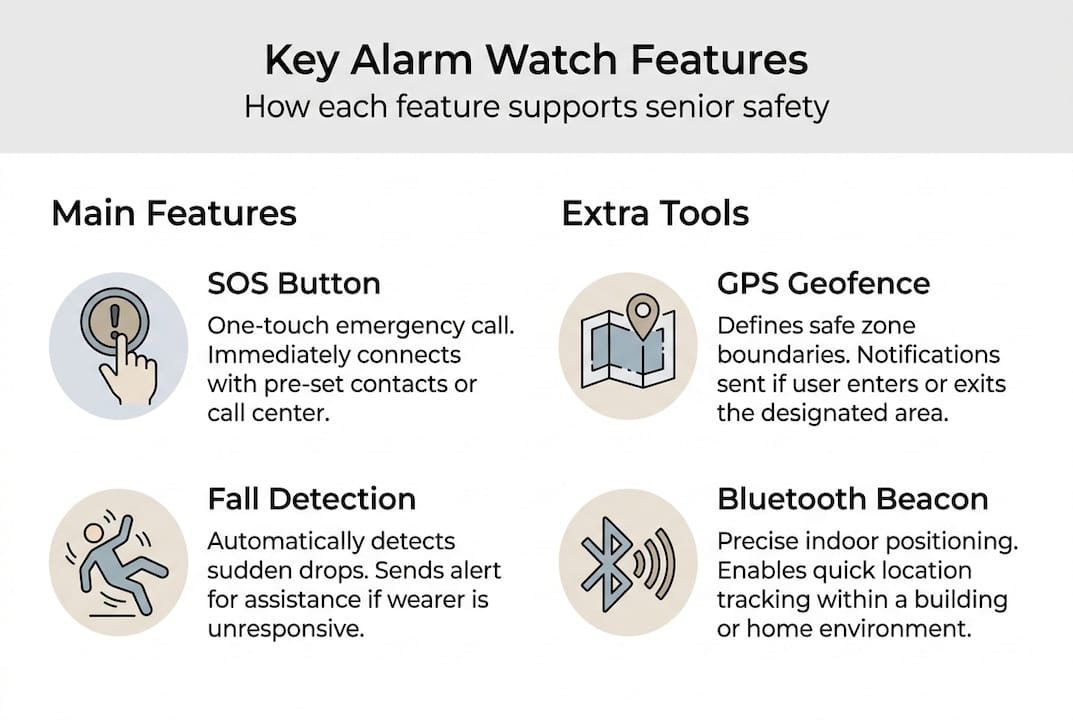
SOS button is the most straightforward feature. One press sends an alert to pre-set contacts and, in some models, triggers a two-way call. It is the single most important feature for any senior living alone. No sensor, no algorithm, just a direct call for help.
Fall detection uses accelerometers and gyroscopes to sense sudden changes in movement and orientation. When the device detects a pattern consistent with a fall, it automatically sends an alert. A wearable fall detection study found sensitivity as high as 97.9% and specificity at 99.9% across 6,750 samples, with deep learning models reaching 93 to 96.5% accuracy on standardized datasets. Those are strong numbers in a lab setting. Real-world performance is more variable, especially for slow or low-impact falls.
GPS geofencing creates a virtual boundary around a defined area. When a senior crosses that boundary, caregivers receive an alert. This is especially useful for seniors with dementia who may wander. Learn more about fall alarm benefits and how location monitoring supports independent living.
Bluetooth proximity beacons work differently. They detect when a senior moves away from a paired device, like a home hub. They are more reliable indoors than GPS and work well for monitoring home exits.
Here is a quick comparison:
| Feature | Best use case | Indoor reliability | Automatic alert |
|---|---|---|---|
| SOS button | Any emergency | High | No (manual) |
| Fall detection | Unwitnessed falls | High | Yes |
| GPS geofencing | Outdoor wandering | Low | Yes |
| Bluetooth beacon | Home exit monitoring | High | Yes |
Understanding how fall detection works in practice helps caregivers avoid over-relying on any single feature.
False alarms and missed events: Limitations you should know
Even the best technology has real limitations. Knowing them upfront prevents frustration and keeps everyone safer.
GPS signals weaken significantly indoors. A senior sitting in their living room may appear to be outside the geofence boundary simply because the signal drifted. This causes false alarms that erode caregiver trust over time. Bluetooth beacons are far more reliable for home-based monitoring, particularly for dementia cases.
Fall detection has its own blind spots. Pooled sensitivity rates range from roughly 55% to 98%, with specificity between 89% and 99.9% depending on the device and placement. Slow slides to the floor, low-impact stumbles, and falls onto soft surfaces are frequently missed. On the other hand, vigorous activity like dancing or exercise can trigger false positives.
Sensor placement also matters more than most people realize. Wrist-worn devices are less accurate than chest or waist placement, though they are far more practical for daily wear. Hybrid sensors combining accelerometers, gyroscopes, and barometers perform best overall.
Here is a summary of common limitations:
| Issue | Cause | Mitigation |
|---|---|---|
| GPS false alarms indoors | Signal drift | Use Bluetooth beacons at home |
| Missed low-impact falls | Sensor threshold limits | Choose hybrid sensor devices |
| False positives from activity | Vigorous movement patterns | Adjust sensitivity settings |
| Wrist placement inaccuracy | Distance from center of mass | Consider waist clip options |
Steps caregivers can take to reduce problems:
- Review and adjust geofence boundaries regularly
- Test fall detection with simulated movements during setup
- Educate the senior on what triggers alerts and why
- Check battery levels and sensor calibration weekly
- Use a device with adjustable sensitivity settings
For a detailed side-by-side review, the compare SOS watches guide covers current models and their real-world performance. The SOS bracelet guide also explains how different alarm formats compare.
Pro Tip: Opt for watches with hybrid sensors combining accelerometers and gyroscopes. They produce fewer false alarms and catch a wider range of fall types than single-sensor devices.
Caregiver needs and practical choices: Finding the right fit
Knowing the limitations of each technology is only half the equation. The other half is matching the right device to the right person and situation.
Professional monitoring services like Medical Guardian are consistently preferred by caregivers over consumer smartwatches like the Apple Watch for seniors with mobility issues or dementia. The reasons are practical: longer battery life, simpler interfaces, and 24/7 dispatch that does not depend on a family member being available.
Consumer devices offer flexibility and, in some cases, no monthly fees. Some models like the MorePro PulseMax operate without a subscription but require a SIM card and manual configuration. Subscription-based professional services typically run $30 to $50 per month and include round-the-clock monitoring with trained dispatchers.
Here is how to think through the decision:
- For seniors with dementia or wandering behavior: Prioritize locking straps, Bluetooth home exit alerts, and professional monitoring
- For seniors with high fall risk: Choose hybrid sensor fall detection with automatic alerts
- For active seniors living independently: A no-subscription device with GPS and SOS may be sufficient
- For caregivers who travel or work: Professional monitoring removes the burden of being the sole responder
“Longer battery life and a simpler interface are what caregivers actually want, not more features they have to explain.”
Avoid feature overload. A device with ten functions that a senior uses incorrectly is less safe than a simple watch with one reliable SOS button. The alarm device comparison resource helps narrow down options based on specific needs. Understanding how the alarm button works in practice is also a useful starting point for families new to these devices.
Battery life deserves special attention. A device that needs daily charging is a device that will eventually be found dead when it matters most. Look for watches with at least 48 to 72 hours of battery life, and set a consistent charging routine.
KUUS shop: Solutions for senior alarm watches
When you’re ready to put this knowledge into action, KUUS shop offers real solutions designed specifically for seniors and their caregivers. Every product in the range is built around simplicity, reliability, and peace of mind.
KUUS offers a curated selection of GPS alarm watches and SOS devices without monthly subscription fees. Whether you need a device for a parent who lives alone or a loved one with early-stage dementia, the range covers a variety of needs and budgets. Explore the value of a GPS watch for seniors to understand what these devices genuinely offer in daily life. Browse the best GPS tracker for seniors without a subscription, or use the compare alarm watches guide to find the right fit for your specific situation.
Frequently asked questions
How does fall detection in alarm watches actually work?
Fall detection uses accelerometers and gyroscopes to sense sudden changes in movement and body orientation. Accuracy varies significantly depending on sensor quality, device placement, and whether the fall is high-impact or slow.
Why do alarm watches sometimes trigger false alarms indoors?
GPS signals lose accuracy inside buildings, which causes geofencing systems to misread a senior’s location and trigger unnecessary alerts. Bluetooth beacons are a more reliable option for monitoring home exits and indoor movement.
Are there alarm watches without monthly fees?
Yes. Some devices operate without a subscription but require a SIM card for cellular connectivity. Subscription models typically cost $30 to $50 per month and include 24/7 professional dispatch.
What’s the difference between professional and consumer alarm watches?
Professional monitoring provides trained dispatchers, greater reliability, and simpler interfaces suited to seniors with dementia or mobility challenges. Consumer devices offer more flexibility but require manual oversight and configuration by caregivers.